Pixel Beads
- 4.4
- Rating
- 10.00K
- Installs
- Free
- Price
 Analysis by App-foxy
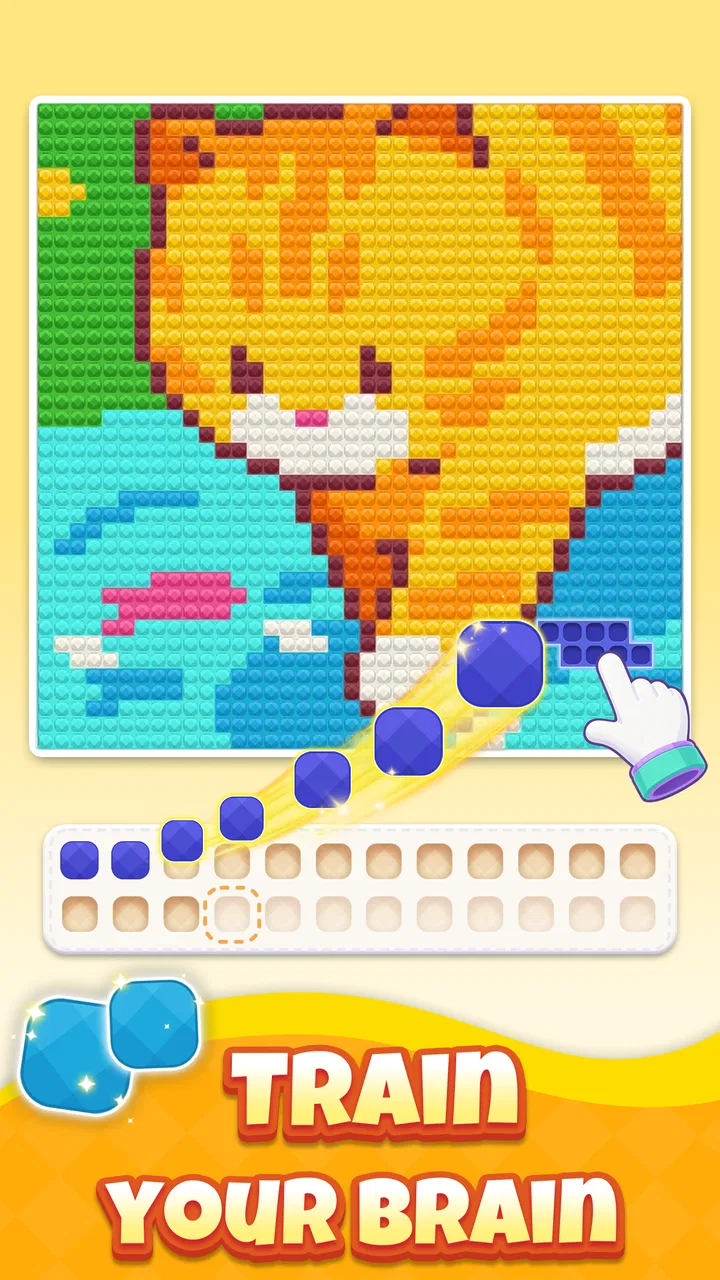
Pixel Beads is the kind of board game I open when I want something quiet to do with my hands rather than another fast, demanding challenge. Its central idea is simple: I sort colored gem beads, place matching colors, and gradually uncover pixel-art pictures. That combination gives it a gentle rhythm, somewhere between a color-matching puzzle and a digital craft activity. I found it easy to understand within a few moments, but the small decisions involved in organizing colors give the experience more substance than a basic coloring screen.
Developed by Kiwi Fun, this free game sits in the board category and is aimed at Everyone. It has reached over ten thousand installs and holds a 4.4 average from around two hundred ratings, with dozens of written reviews. Those figures suggest a modest but clearly interested audience rather than a huge mainstream following. In my experience, that fits the game well: it feels focused and approachable, designed for short personal sessions instead of a sprawling competitive community.
How the current version feels to play
The current release is version 1.2.8, and the basic experience is already easy to pick up. A typical session begins with a board containing bead-like pieces and a picture that is not immediately visible in full. I work through the available colors, matching them to the appropriate areas, and watch the image take shape. The reward is not just completing a puzzle; it is seeing a hidden illustration become recognizable through a series of small, orderly actions.
You May Also Like

 AccuWeather: Weather Radar
AccuWeather Review: A Quick, Clear Forecast for Everyday Decisions
For everyday plans, the best forecast is the one you can understand quickly. AccuWeather makes rain timing, radar, and local conditions easy to act on, with a few trade-offs.

 Hill Climb Racing
Why Hill Climb Racing Still Turns Crashes Into One More Run
A tiny car, a bumpy hill and one more upgrade: Hill Climb Racing keeps resurfacing because its simple chaos makes every near-miss feel personal.

 AliExpress - Shopping App
AliExpress Makes Global Shopping Feel Personal, but Shoppers Bear the Risk
AliExpress turns a global marketplace into a pocket-sized discovery engine. Its reach is useful, its shopping loop compelling, and its trade-offs easy to miss.

 Lords Mobile: Kingdom Wars
Lords Mobile Is a Kingdom-Building Routine, Not a Quick Match
A case-by-case verdict on the building, battles, device demands, and social commitments that make Lords Mobile rewarding for some players and exhausting for others.

 PDF Scanner app - TapScanner
TapScanner Makes Paperwork Easier to Capture, Check, and Share
TapScanner makes scanning with a phone feel less like a rescue operation and more like a dependable step in getting work done. Its capture tools are useful, though not flawless.

 Block Blast!
 Shows How Much a Puzzle Game Can Leave Out
A quiet grid game shows why puzzle players increasingly value instant clarity, repeatable skill and low-pressure play—and where the genre still needs to catch up.
More From Our News Desk
View All News


That structure makes Pixel Beads especially comfortable for players who enjoy visual progress. I do not need to memorize complicated rules, plan several turns ahead, or compete against a clock. Instead, I can concentrate on the next color group and let the picture provide a reason to continue. The game feels more like arranging a tray of craft materials than solving a traditional board-game position, which is precisely why it may appeal to people who normally avoid puzzle games.
The board format matters here. Unlike a conventional color-by-number app, the pieces give each action a tangible sense of placement. Even though everything happens on a screen, sorting the beads and fitting matching colors creates a repeated physical logic: identify, separate, place, inspect. That loop is satisfying when I want a low-pressure activity, particularly during a break when a full game or long video would feel excessive.
I also appreciate that the hidden-art approach gives the session a clear destination. In an ordinary matching game, a successful move may simply remove objects or increase a score. Here, each correct placement contributes to an image. That makes progress easier to read emotionally. When only part of the artwork is visible, I have a reason to keep going because I want to understand what the completed picture will look like.
A practical routine for short sessions
Pixel Beads works well in a small daily routine. I can imagine opening it while waiting for an appointment, taking a few minutes after lunch, or winding down before bed. The best approach is not to treat every board as a task that must be finished immediately. I get more from it when I divide the puzzle into manageable color groups, complete one area, and pause when my attention starts to wander.
One useful habit is to scan the whole board before making the first placement. Rather than grabbing the most obvious bead, I look for repeated colors and notice where a particular shade seems concentrated. This reduces unnecessary switching between groups and helps me maintain a cleaner mental map. It is a small adjustment, but it changes the game from random tapping into a calmer sorting process.
Another helpful technique is to use the emerging picture as a guide without relying on it too early. Partially revealed art can suggest what belongs next, but guessing from an incomplete image may lead to rushed choices. I prefer to trust the color arrangement first and use the illustration as a confirmation. That balance is one of the more interesting parts of the game: the board supplies the immediate logic, while the artwork supplies the broader context.
For someone who plays on a phone during a noisy commute, the visual nature of the game is convenient because it does not appear to depend on spoken instructions or constant audio attention. I would still choose a larger screen if I wanted to spend a long time with it, since sorting small colored pieces can become less comfortable when the display is cramped. That is not a flaw unique to this title, but it is worth considering before making it a regular habit.
What the latest release means for players
The present version gives new players a sensible point of entry because the core loop is immediately readable. I did not need a long explanation to understand the relationship between beads, colors, and the concealed artwork. For existing players, version 1.2.8 represents the state they will encounter now, so the practical question is whether the current presentation remains enjoyable after the novelty of the first pictures fades.
My answer is that the game’s lasting appeal depends less on complexity than on the pleasure of repetition. If you like sorting, gradual completion, and small visual reveals, the same basic structure can remain relaxing. If you need constantly changing rules, deep strategy, or a strong sense of mastery, the experience may feel too narrow. The release is best understood as a refinement of a focused idea rather than a board game trying to become a large system of competing mechanics.
The free entry point also makes it easy to test the rhythm without committing money upfront. At the same time, in-app purchases range from $1.99 to $99.99 per item, so I would approach optional spending deliberately. A low-cost purchase may feel reasonable if it supports a longer session or removes a particular irritation, but the highest-priced option deserves much more thought. I would never recommend buying simply because a board becomes slow or because the artwork creates a moment of impatience.
This is where the current release deserves a measured assessment. The game can be enjoyable without turning every session into a purchase decision, but players who are sensitive to monetization should pay attention to how they respond to optional offers. My personal rule would be to play several boards first, decide whether the sorting-and-reveal loop genuinely holds my attention, and only then consider spending. That keeps the decision based on lasting enjoyment rather than first impressions.
Who benefits most from the design
I would recommend Pixel Beads to people who enjoy coloring, simple matching, visual organization, and calm puzzle sessions. It is also a good fit for a family member who wants something more interactive than a static coloring activity but less demanding than a strategy board game. The Everyone age rating supports that broad accessibility, although younger players may still benefit from an adult helping them understand any purchase choices on a shared device.
The game may also suit players who find traditional puzzle pressure tiring. There is no need to race through a level simply to prove skill. The satisfaction comes from making the board more orderly and watching the image emerge. That makes it a reasonable choice for a quiet evening when I want a sense of completion without the emotional intensity of competitive play.
On the other hand, I would skip it if my main reason for downloading a board game were strategic depth. Pixel Beads does not replace chess, checkers, a tactical card game, or a traditional match-three title for someone seeking layered planning. Those alternatives offer stronger competition, more varied decision-making, or clearer score-based goals. This game’s strength is not intellectual complexity; it is the soothing combination of sorting and visual discovery.
I would also look elsewhere if I wanted a pure coloring application with complete control over every brush, shade, and texture. Pixel Beads gives the player a structured path through colored pieces instead of an open canvas. That limitation is part of its identity. It removes the pressure of deciding what to draw, but it also means I cannot freely reinterpret the picture in my own style.
Small strategies that improve the experience
The first non-obvious advantage is that sorting can be treated as a planning stage rather than busywork. I get better results when I group attention by color families and keep track of the areas that are nearly complete. This is particularly useful when several shades look similar. Completing a nearly finished section can reveal enough of the picture to orient the rest of the board, while jumping randomly between isolated pieces tends to make the session feel more scattered.
The second insight is that the reveal itself can help manage fatigue. If I notice that I am repeatedly checking the same area without making progress, I shift focus to a different color or a more recognizable part of the image. That gives my eyes a change of pattern while still moving the board forward. It is a simple way to avoid turning a relaxing activity into a frustrating search.
The third trade-off is between speed and satisfaction. Finishing quickly may feel efficient, but the game’s appeal comes from noticing the transformation. I prefer a slower pace when the artwork is beginning to take shape, because rushing can reduce the visual reward that makes the puzzle distinctive. Players who care mainly about completion may choose a more direct approach; players using the game to unwind should resist treating it like a productivity test.
A fourth practical point concerns device choice. On a phone, the game is convenient for brief sessions, but a tablet-sized display would likely make color separation and small placements easier for extended play. I would also keep screen brightness comfortable, since repeatedly studying similar shades can be tiring in a dark room. These adjustments do not change the mechanics, yet they can determine whether the game feels soothing or visually demanding.
Where the experience still has limits
The focused design can become repetitive. Once I understand the pattern of sorting beads and revealing art, there is little mystery about how a new board will function. The pictures may provide fresh motivation, but the underlying interaction remains familiar. That is acceptable for a relaxation game, though it means the title is better for returning in short bursts than for marathon sessions.
Another limitation is that the game’s appeal depends heavily on the quality and variety of its artwork. If a particular image does not interest me, the board can feel like an obligation rather than an invitation. In a strategy game, a less appealing theme can be offset by an engaging decision system. Here, the picture is part of the reward, so visual variety matters more to the overall impression.
The purchase range is also something I would keep in mind. Free access lowers the barrier to trying the game, but optional items can change how comfortable the experience feels for different players. Someone who wants a completely uninterrupted, no-spend session should decide early whether the available free play meets their needs. Someone comfortable with occasional purchases may find the arrangement acceptable, but should still set a personal limit before browsing the options.
There is also a difference between relaxation and accessibility. The simple rules are welcoming, but distinguishing close colors may not be equally easy for everyone. I would be cautious about recommending it to a player who has difficulty separating similar shades unless they have tried the board presentation themselves. The game’s central mechanic relies on color recognition, so that consideration is more important here than in many other board titles.
How it compares with familiar alternatives
Compared with match-three games, Pixel Beads feels slower and more deliberate. There is less emphasis on creating chains, reacting quickly, or chasing a high score. I prefer it when I want control over the pace, while I would choose a match-three game when I need energetic feedback and frequent tactical surprises.
Compared with digital coloring books, this title offers more structure. I do not begin with a blank creative decision or have to select every artistic detail. The bead-sorting process tells me what kind of action to take, and the hidden picture gives the work a sense of discovery. The trade-off is reduced freedom: the satisfaction comes from completing the intended arrangement, not from making an individual artistic interpretation.
Compared with classic board games, it is much less competitive and much more solitary. There is no need to learn a strategy guide or find another player. That makes it convenient, but it also removes the social tension and replay variety that make games such as checkers or chess last for years. I see Pixel Beads as a companion to those games, not a replacement.
It also differs from conventional jigsaw puzzles. A jigsaw asks me to reason from shapes and image fragments, whereas this game organizes the task around color and placement. Someone who loves sorting a physical puzzle may enjoy the familiar orderliness, but the screen-based format is quicker to start and easier to pause. Someone who wants the tactile resistance of real pieces will probably find a physical puzzle more satisfying.
Should you install it now?
For a free board game built around colored beads and hidden pixel art, Pixel Beads has a clear personality. I like that it gives each small action a visible purpose and avoids demanding that I compete, memorize complex rules, or commit to a long session. The current version feels suitable for casual players who want a gentle visual puzzle they can pick up whenever they have a few spare minutes.
I would approach it with realistic expectations. It is not a deep strategy game, an open-ended art studio, or an endlessly varied arcade challenge. Its best moments come from the quiet order of sorting and the gradual satisfaction of seeing an image appear. If that loop sounds appealing, the free download makes trying it straightforward. If you need constant novelty or dislike color-dependent tasks, another board or coloring game will serve you better.
Kiwi Fun has a focused foundation here, and the current release is easy to understand without sacrificing the small pleasure of discovery. For existing players, the important question is whether the steady bead-and-picture routine still feels rewarding after the first few sessions. For newcomers, I suggest starting with short play periods, observing whether the visual reveal genuinely relaxes you, and treating purchases as optional decisions rather than part of the reason to continue.
My final recommendation is simple: choose Pixel Beads when you want a calm, structured way to fill a quiet moment, especially if sorting colors and uncovering pixel art sound more appealing than chasing scores. I would not install it for competitive depth, but I would gladly keep it available for those evenings when a small, orderly puzzle is exactly enough.
FAQs for Pixel Beads
01What is Pixel Beads and how does the app work?
Pixel Beads is a creative pixel-art activity focused on designing colorful bead patterns and turning them into finished creations. After choosing or creating a design, you place beads according to the pixel layout and follow the pattern carefully. It is aimed at users who enjoy crafts, relaxing visual activities, and making decorative projects rather than fast-paced gameplay.
02Is Pixel Beads suitable for children and beginners?
Pixel Beads can be approachable for beginners because its designs generally rely on simple grids, recognizable shapes, and step-by-step placement. However, the physical beads may be small and should be kept away from very young children because of choking risks. Parents should also supervise younger users, especially when ironing or permanently joining a completed bead design.
03Does Pixel Beads require an internet connection?
The basic creative experience may be usable without a constant internet connection, particularly when working with designs or features already available on the device. Nevertheless, an internet connection can be necessary for downloading new patterns, loading online content, receiving updates, or accessing certain app services. Availability may also differ depending on the version installed and the device platform.
04Are there in-app purchases, advertisements, or premium designs?
The availability of advertisements, optional purchases, and locked content can vary between Pixel Beads versions and may change after updates. Some patterns or creative tools could be offered as premium content, while other designs may be accessible for free. Before downloading, users should review the current Google Play or App Store listing and check the purchase settings on their device.
05What should I check before downloading Pixel Beads?
Before installing Pixel Beads, check that your Android or iOS device meets the listed operating-system requirements and has enough free storage for the app and any additional pattern content. It is also worth reviewing the permissions requested, privacy information, age guidance, and recent user reviews. If you plan to use physical beads, confirm that the required materials are available separately.
Pros
- Simple interface makes bead pattern creation easy for beginners.
- Works well for relaxing
- low-pressure creative sessions.
- Useful for planning color combinations before starting a project.
- Patterns can inspire both digital and physical bead designs.
- Suitable for quick use without requiring advanced crafting skills.
Cons
- Small screens may make detailed pattern editing uncomfortable.
- Large or complex designs can take considerable time to complete.
- Color choices may look different from real beads or materials.
- Limited features may disappoint experienced pattern designers.
- Some functions may require patience when adjusting individual beads.

Pixel Beads
Gallery